 Why your phone need to be hacked? There are many reason. First reason, your phone can’t install software without signing it. Then, your phone can’t install cracked software. Almost all cracked software not signed. And you need signing it before it can be installed on your phone.
Signing a software is a way to verify that software which will be installed on your phone is from trusted provider. How to signing a software? There are many website for signing a software online. But i won’t explain it here. I will explain, how to self signing a software. Before we start, please install X Plore. You can download it here.
Lets go! Follow step by step:
- Install BinPDA Security Manager on your phone. You can download it here.
- After installation done, there will an icon SecMan in your Installation folder. Run it.
- Go to Option->Turn Plat. Security OFF
- Go to Option->Install root certificate.
- Now your phone can install all software released by BinPDA without signing it first.
- Install SelfSign released by LeftUp. You can download it here.
- After installation done,there will be an icon Mobile Signer at your installation folder.
- Open X-Plore, Go to Menu->Tools->Configuration
- Check Show Hidden File, Show system files/folder.
- Then go to C:\Resource\SwiCertstore\dat
- Replace the 0000001 file with this one (extract it first).
- And your phone has been hacked succesfully.
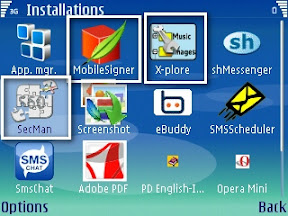
How to self signing a software?
- Do it on your phone
- Open Mobile Signer
- Select installation file that will be being signed.
- Go to Options->SelfSign.
- Your installation file has been signed successfully!
- Do it on your computer
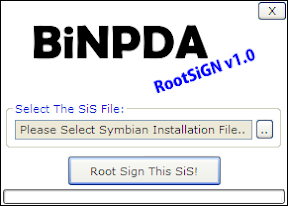
- Open RootSign. (You can download it here)
- Select a installation file.
- Then click ‘Root Sign this sis.
- Your installation file has been signed successfully!
well done..
mmmmmenurut saya lebih tepatnya modding mas, modding your HP.beberapa varian HP juga sangat familiar untuk di Modding, sebut saja iphone,e398,rokr(3 varian ini punya branding dari apple tech.)nokia series can be upgrade…
yang dulunya nggak ada radio bisa jadi ada radionya karena cma softwarenya beda versi,sehingga dibutuhkan semacam software yang mampu memberikan radio virtual.. dan lain jenis moddingnya.
yang pasti modding bertujuan untuk membuat gadget menjadi lebih simplicity dan nice gan…
Nice inpo gan…
@endut: yeah!..
@fattah: Emm..saya lebih prefer ke hack, soalnya ini hanya menjebol proteksi sistem. Bukan mengubah sistemnya. Kalau modding saya pikir lebih ke merubah sistemnya, firmware mungkin. Seperti e398, rokr, itu kan mengubah firmwarenya?kalau tidak salah…
CMIIW
ki aku sajakmen meh nuduh koe ngopy paste..
tapi ketoke tekon sek wae..
iki asli tulisanmu dep??
😀
@sanjaya: asli tulisanku dab…yakin..serius!! bukan copy paste…
hahaha..
good post berarti brohta…
hehehehe
😀
londonisme…. melu-melu posting nggo boso londo ah 😉
[OOT] p.agfi melu PE …?!?!?!?
@sanjaya: siap gan!!!
@salakberduri: haha..ayo… iyo Pak Agfi ikut PE…
I searched for \’Software For I-phone\’ at google and found this your post (\’ur Symbian OS 60 v3 Phone and Self Signing Software! – ..::d3ptzz personal blog::…\’) in search results. Not very relevant result, but still interesting to read.
iya memang ngubah firmwarenya gan.Keren posting
dept ini lebih manjur! gak usak pke mobileSigner
http://www.mediafire.com/file/umkgxnzunwm/hack_security_s60v3.rar
koleksi aplikasi s60v3
http://www.mediafire.com/?sharekey=5cbc56d87b72dab24012e8015643d9c85d0bb0a1290f2b26
@fattah: sip gan..
@d4rkbit3: siap gan..saya coba dulu…
ini cara ngesigned aplikasi S60 yang terbukti ampuh ketimbang online signing di http://www.symbiansigned.com
@altroz: yups. terimakasih infonya. kebetulan yang dibahas disini yang offline signing..:)
Thanx atas info
kk anak mna?
@ezha: bisa dilihat di page who am i..:D
man this doesnt work on nokia E-71 and im no proframer what do i do to hack this thing?
@supermatt, what firmware version you have?
bos kalo merename file di symbian s60 v2 ke atas dan nokia s40 terbaru pakai Mini Commander ato Mobyexplore gimana biar tidak read only dan bisa merubah nama file?
soalnya ceritanya gini di N70 file jar aq rename pake FExplorer misal dari kamus.jar ke kamus.jare biar bisa di send via bluetooth. aq kirim ke hp nokia s40 yg thn 2009 ke atas pakai aplikasi mobiexplorer java, waktu merename tidak bisa, bos mungkin ada solusi?
bagi yang mau hack dengan cara yang lain dan lebih mudah
bisa di liat di link dibawah ini
http://deandrea-myforum.blogspot.com/search/label/Hack%20Ponsel
SELAMAT MENCOBA
hadooohhhh w coba instal xplor na kaga mau bos….
krang lebih warningna aplikasi ga bisa dijalankan sertifikat error
@maulana: coba download langsung versi terbarunya di website resminya di http://www.lonelycatgames.com
Damn, awesome website. I actually came across this on Yahoo, and I am happy I did. I will definately be coming back here more often. Wish I could add to the posts here and bring a bit more to the site, but am just absorbing as much info as I can at the moment.
Thank You
Mobile Phones Deals